Adding persistent server management with SSH validation
This time I worked on improving the deploy flow by adding persistent server management…
Across three commits (first, second, third), I added server management so I no longer have to enter the same server details over and over again every time I want to deploy an app.
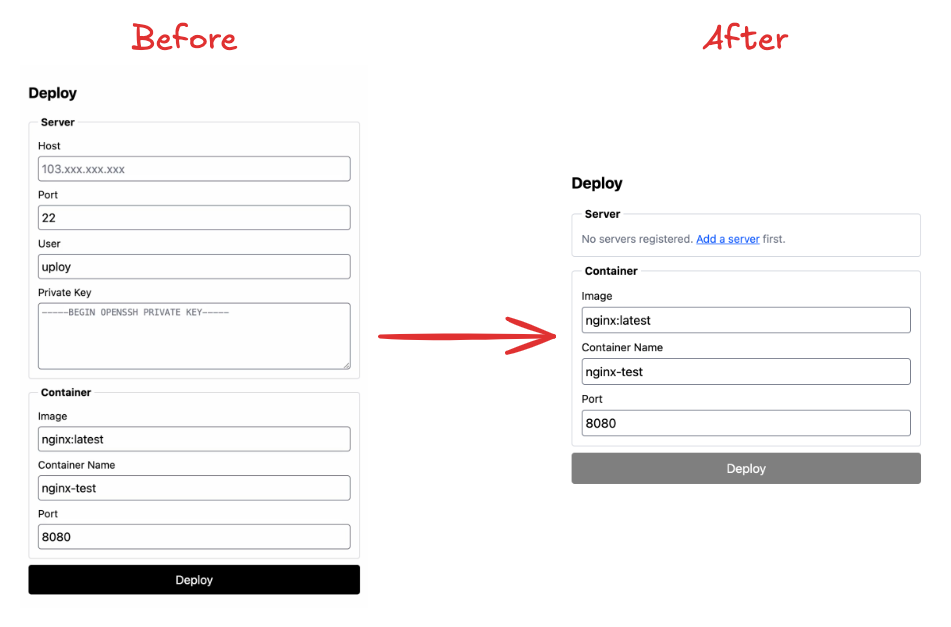
Before this, the deploy flow was still not persistent. If I wanted to deploy something, I had to manually fill in the host, port, user, and private key every single time. It worked… but it was clearly not the kind of experience I want long term for a PaaS.
So I changed that by storing server data in the database.
Now, instead of repeatedly filling in the same server information, I can save the server once, then later just choose that server when deploying and only fill in the container-related fields for what I want to run on that machine. That already feels much closer to the product direction I have in mind.
What I like here is that this feature is not just CRUD. There is also an SSH session check during server creation, as you can see in this part of the first commit. I added that because I do not want users to store fake or invalid server data that only fails much later during deployment.
For example, if someone enters bogus server details like the host IP 100.100.100.100, the app will immediately return an error instead of pretending the server is valid and saving bad data into the database.
Here’s the demo video…
To make sure the validation was actually working correctly, I also tested it with a real server that I own. In the first attempt, the save still failed with a [none pubkey] error. That happened because I had not yet added the public key generated from ssh-keygen to the target server.
That was actually a nice reminder of how this flow really works: the control plane machine — which for now is still my Mac — needs the private key, while the target server needs the matching public key inside ~/.ssh/authorized_keys.
So in the demo, I added the public key directly into ~/.ssh/authorized_keys on my VM, then tried saving the same server details again. This time, the server was stored successfully 😆
I like this kind of validation because it makes the feature feel more honest. The app is not just storing user input blindly… it is checking whether that server can actually be reached in a way that matches the deployment model I am building.
Here’s the demo video…